
 Google Play
Almost every beginner starts by cranking sensitivity to maximum. The logic is obvious: more sensitivity, more depth. In practice more sensitivity means more triggers from grass, from your spade hitting the ground, and from a power line a couple of kilometres away. Then comes the screen: it shows 78 and your hand is already on the spade; it shows 12 and you walk on. That's roughly how the first month goes for most people, and roughly how half the finds get left behind.
The goal of the first setup isn't depth. It's for the machine to stay quiet when there's nothing under the coil. Everything else is measured from that silence — reading the scale included, and the decision whether to dig.
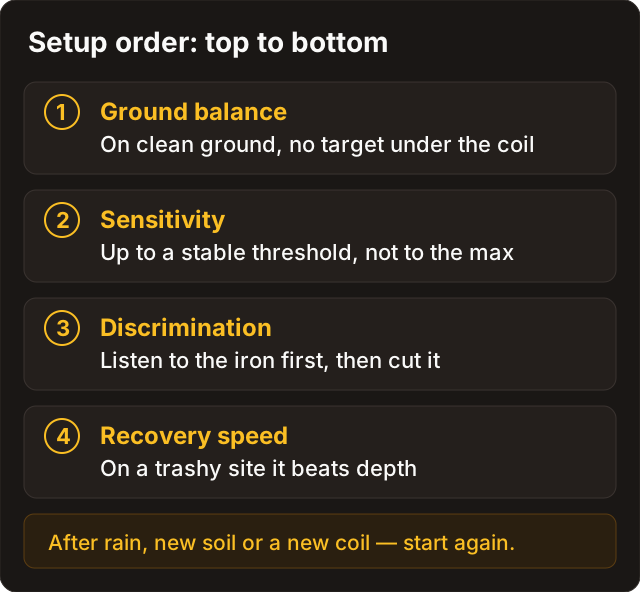
Ground balance
On mineralised soil and on beaches, a machine without ground balance will scream constantly, and no amount of sensitivity adjustment will fix it.
Balance on clean ground with no target under the coil, and re-check when you move to a different zone. Auto ground balance is convenient but doesn't remove the need to listen: if the threshold is still uneven after auto-GB, it's time to do it by hand.
Sensitivity
Turn it down until the threshold is even. Yes, you lose some very deep targets — precisely the ones you would not have dug anyway, because you would never have heard them through the phantoms. In exchange you stop digging nothing, which across an outing adds up to considerably more finds.
The setting isn't permanent: after rain, on different ground, or with a different coil fitted, sensitivity needs re-seating.
Recovery speed
If your machine has it, in trash it matters more than maximum sensitivity: the detector has to let go of one target in time to take the next. On clean ground you can afford a little more depth — but only with a stable threshold.
What VDI actually shows
VDI (Visual Discrimination Indicator) is an estimate of a target's conductivity — a hint. Not a passport, not a guarantee, and certainly not a diagnosis.
The detector evaluates how a target responds to an electromagnetic field and turns that into a number or a position on a scale. Low values tend towards iron and foil, mid and high values towards non-ferrous metals. "Tend" is the operative word: the same coin reads differently at different depths, in different soil and at different angles. And the scales don't match between manufacturers: Equinox, Manticore, Deus II and Legend speak different dialects. Which is why somebody else's chart from a group chat is useless — the machine you need to learn is yours.
Five reasons the number lies
- Depth. A weak signal drifts across the scale.
- Adjacent iron. The non-ferrous target gets masked and the VDI jumps.
- Shape and angle. A ring on edge and a coin lying flat are completely different responses.
- Mineralisation and salt. Beaches and red soil shift the ID; that's exactly why you read the Manticore's ID Map rather than a single digit.
- Caps and bi-metal. The classic impostors. Ferrocheck helps on the Legend, but a second sweep and a pinpointer help on everything.
Discrimination: what it costs
Discrimination mutes or removes part of the scale so you dig less rubbish. The great temptation of day one is to notch out half the scale. Don't: along with the nails you'll notch out non-ferrous targets lying next to iron or standing on edge. The right order is the reverse — first learn to hear iron, then decide what to mask.
| Approach | Upside | Downside |
|---|---|---|
| Heavy iron discrimination | Fewer caps and nails | You cut masked non-ferrous, and useful information about nearby iron |
| Mild discrimination or all-metal | More data about the target | More holes, requires discipline |
| Notching one band | Removes a familiar trash peak | Easy to notch out coins in the same range |
The field rule is simple: stable ground and a readable tone first, fine discrimination second. A day that starts with "notch everything below forty" usually ends that way too.
All Metal or discriminate
On new or heavily trashed ground, more information is better: all-metal or low discrimination, so you understand what you're dealing with. On clean pasture worked for coins, moderate iron discrimination saves time and energy. On a beach the priority is different — first get the machine to stop reacting to salt, and only then touch discrimination.
Three myths
"VDI 80 always means silver." It doesn't. It's a range, and plenty of things land in it.
"Nobody digs iron." People do: non-ferrous hides next to iron, and sometimes the iron object itself is a buckle or a fitting that dates the site.
"Higher discrimination means a more experienced detectorist." If anything, the reverse: usually it means somebody can't hear half the scale and chose to switch it off.
The test garden: ten minutes that pay back
- Bury a nail, a bottle cap, a copper coin and something silver in familiar soil.
- Run a mode where iron is still audible, or keep discrimination mild.
- Sweep each one and memorise the tone, not just the number.
- Write down the VDI and the mode.
- Carry the habit into the field: check the target from several directions, finish with the pinpointer, and don't change three parameters at once, or you won't know which one did it.
Write down settings and signals
After the test garden, save in the outing note: program, sensitivity, ground balance mode, discrimination, coil. Next to a photo of the find — the VDI and the mode. After twenty outings you'll have your own chart — the only one worth trusting — and you'll be comparing facts instead of impressions. Especially useful when the ground changes or new firmware lands.
Before you start the grid
- Ground balance done on the ground you're standing on.
- Sensitivity stable, not "99".
- Discrimination isn't floored until the ground is stable.
- I know my machine's scale, at least roughly.
- The decision to dig comes from tone and repeatability, not one number.
- Headphones comfortable, pinpointer on and tested.
- Doubtful targets go in the diary with the VDI and a note.
FAQ
Beach and salt — what changes?
Stable ground balance, weather sealing, and patience with quiet non-ferrous signals: gold on a beach sounds modest. A woodland setup with no beach mode is best left at home.
Heavy iron trash?
Recovery speed and your ears matter more than maximum sensitivity, and discrimination stays mild so you can hear where iron masks non-ferrous. How to work such sites is in tactics.
Mineralisation screaming — broken machine?
Almost never. Usually it's a skipped ground balance or sensitivity set too high — go back to the Ground balance and Sensitivity sections above.
Hunt in storms / at night?
In a thunderstorm, no, and that isn't about finds but about sense. See the safety guide.
Odd finds (bi-metal, stones)?
Cleaning is in special restoration cases. In the field, photos only and no chemistry.
Does one “universal” mode work everywhere?
Rarely. Salt, trash and clean pasture want different things, and the result of each program change is worth logging — otherwise in a month you'll be guessing again.
Why does the same coin show different numbers?
Because VDI depends on depth, angle, nearby iron and the soil. The number is a range, not a point: trust the tone, the repeat from several directions, and your own chart built from your own finds.